Equation Snippets & Templates
What's New
Prebuilt equation patterns for quick formula building with one-click insertion and dynamic value updating. Build complex equations faster with dozens of practical examples.
Prebuilt Equation Templates
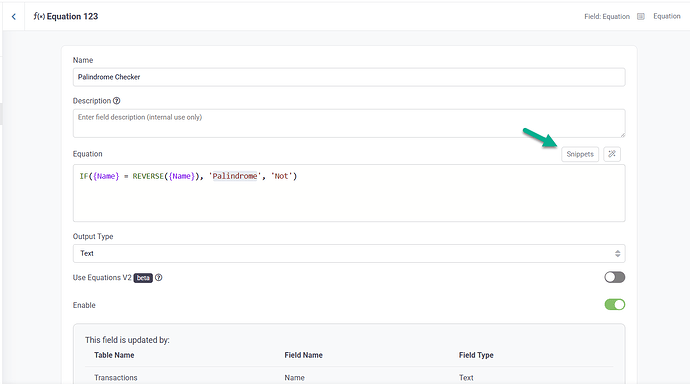
Access dozens of ready-to-use equation patterns:
- Common Patterns: Frequently used equation structures
- Practical Examples: Real-world equation scenarios
- Best Practices: Equations built following Tadabase conventions
- Time-Saving: No need to build common equations from scratch
One-Click Insertion
Insert templates with a single click: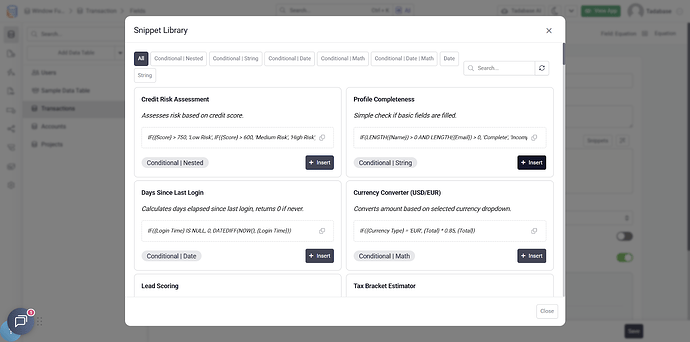
- Browse available templates
- Click to insert into your equation
- Template appears with placeholder values
- Replace placeholders with your actual fields
Dynamic Value Updating
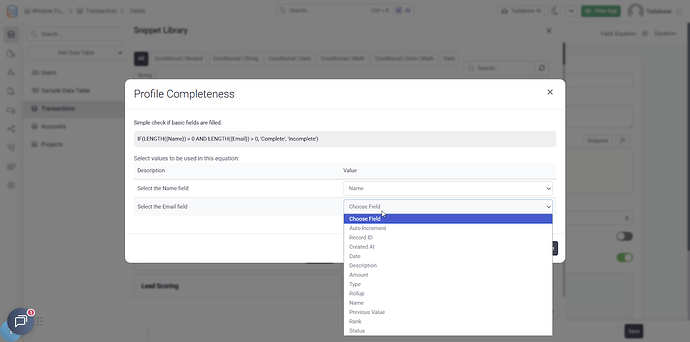
Templates include placeholders that update dynamically:
- Field placeholders map to your app fields
- Easy field selection via dropdowns
- Values automatically update when fields change
- No manual value management needed
Example Template Categories
- Date Calculations: Days between dates, age calculations, date math
- Financial Formulas: Percentage calculations, tax calculations, discounts
- Text Operations: Concatenation, substring extraction, formatting
- Conditional Logic: If/then statements, case statements, multi-condition logic
- Aggregations: Sums, averages, counts with conditions
- Math Operations: Complex calculations, rounding, conversions
Example: Age Calculation
Instead of figuring out the date math yourself, insert the "Calculate Age" template:
DATEDIFF(NOW(), [Date of Birth], 'years')Then just replace [Date of Birth] with your actual field.
How to Use Templates
- Open the equation editor
- Click "Templates" or "Snippets"
- Browse available equation patterns
- Click to insert the template
- Replace placeholders with your fields
- Test and save
We'd love to hear your feedback.