Automation and Field Updates
What's New
Three powerful automation enhancements: Changed From/To conditions for number and text fields, text field optimization options, and batch updates now work on connection fields.
Changed From / Changed To Conditions
Number and text fields now support "Changed From" and "Changed To" conditions: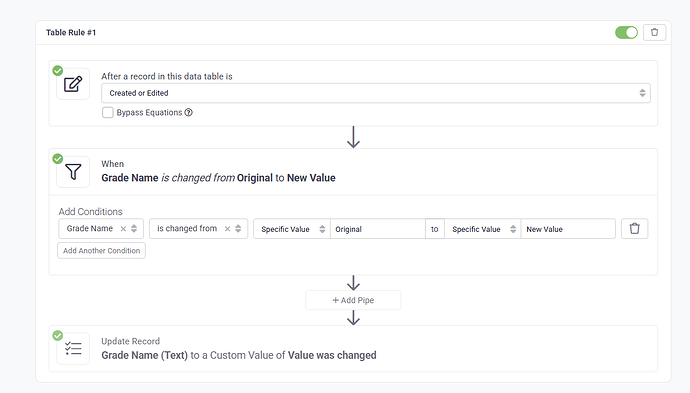
What This Enables
- Track Specific Changes: Trigger automations when field values change from one specific value to another
- Precise Control: Only run rules when exact change conditions are met
- Change Detection: Detect meaningful state transitions
- Workflow Automation: Automate based on specific value changes
Use Cases
- Status Tracking: "When Status changes from 'Pending' to 'Approved', send notification"
- Price Monitoring: "When Price changes from any value to 0, alert manager"
- Stage Progression: "When Stage changes from 'Lead' to 'Customer', create welcome email"
- Priority Escalation: "When Priority changes to 'Urgent', notify support team"
Text Field Optimization Options
New options for text fields improve performance and data consistency: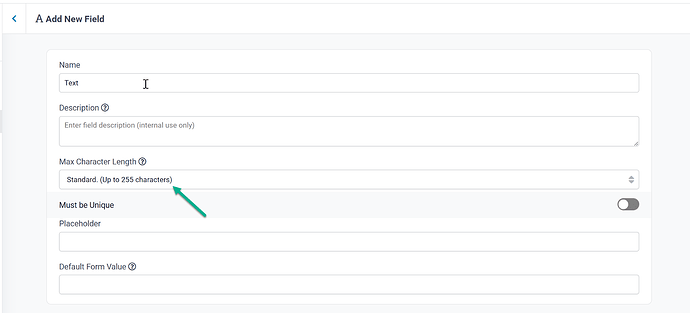
Character Limits
- Set maximum character limits for text fields
- Improve performance with controlled field sizes
- Ensure data consistency
- Prevent excessively long text entries
Field Resizing
- Resize text fields to optimal width
- More efficient use of table space
- Better display in table views
- Improved readability
Batch Updates for Join Fields
Batch Updates now work on Connection Fields (Join Fields):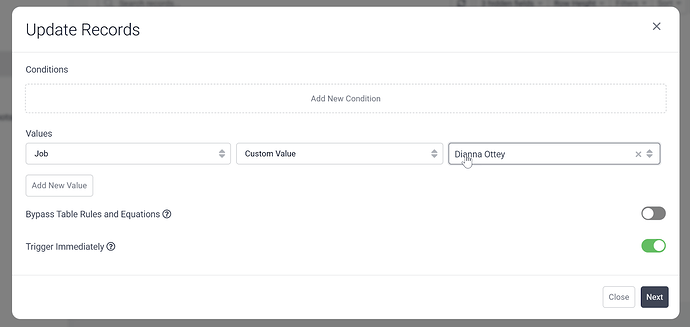
New Capability
- Select multiple records
- Update connection field values in bulk
- Assign or change relationships for many records at once
- Massive time savings for relationship management
Use Cases
- Bulk Assignment: Assign 50 tasks to a new project manager
- Relationship Updates: Change customer assignments for multiple orders
- Category Changes: Move multiple products to a new category
- Team Reorganization: Reassign employees to new departments
Example: Status Change Automation
Create a Record Rule with "Changed From/To" condition:
- Trigger: When "Order Status" changes from "Processing" to "Shipped"
- Action: Send email to customer with tracking information
- Result: Customers automatically notified only when orders ship, not on other status changes
We'd love to hear your feedback.