Contextual and Inline Help Throughout Builder
What's New
Extensive contextual and inline help has been added throughout the builder, providing tailored guidance that references your existing app and subscription details.
Context-Aware Assistance
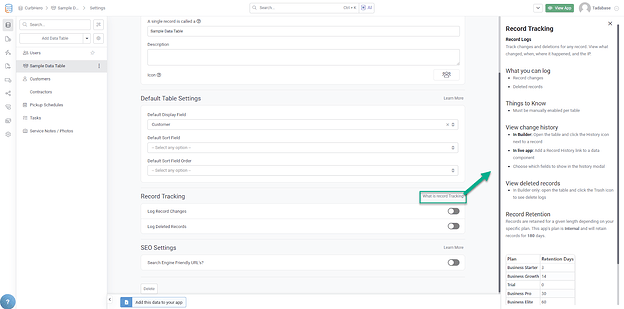
Help appears where you need it, when you need it:
- Inline Guidance: Help text appears directly in the builder interface
- Contextual Tips: Relevant advice based on what you're currently doing
- Tooltips and Explanations: Quick explanations for builder features
- Learn Without Leaving: Get answers without switching to documentation
Personalized to Your App
The help system references your specific app and subscription:
- Aware of your subscription plan features
- Understands your app structure
- Provides relevant suggestions based on your setup
- Tailored answers instead of generic documentation
Enhanced Help Sidebar
New Fields Modal with Inline Help
Creating new fields has been updated with helpful inline information:
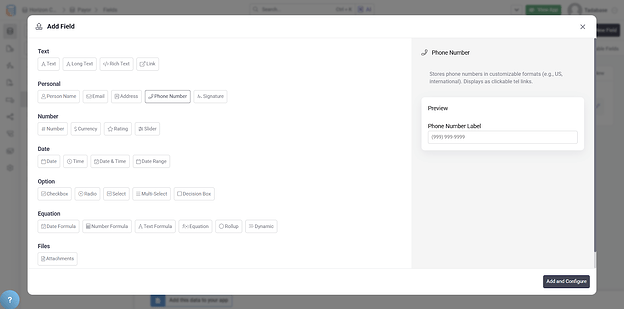
- Inline process for field creation
- Helpful popup with explanations
- Description of each field type
- Guidance on when to use each field
Help Throughout the Builder
- Field Types: Explanations when choosing field types
- Component Settings: Tooltips for component configuration options
- Rules and Actions: Guidance on rule conditions and actions
- Page Builder: Help with layout and design options
- Data Builder: Tips for structuring your data model
Pro Tip
When learning a new feature, look for the help icons and hover tooltips throughout the builder. These often contain valuable tips and examples specific to your app.
We'd love to hear your feedback.